Showing posts with label Endnote. Show all posts

Thursday, June 26, 2014

Endnote, Where did the label for citations in my word document go?

Oopsy ... so long a title, although it's an issue I came across and was sort of driving me nuts: the inconsistency in the Endnote interface.

I know Endnote had given me this label under "All References" before. However, it seems to reveal itself to me at its own will, if not leisure.
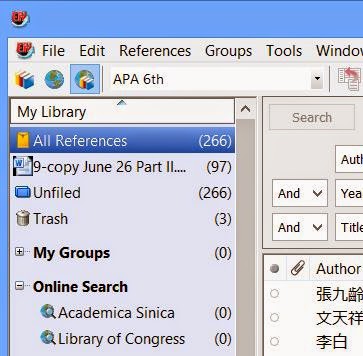

For instance, in the following snapshot, the label is gone.


Ended up, the reality might have been related to the fact that I turned Instance Formatting Off.

All that I had to do was to click "Update Citation and Bibliography" and wait patiently for the programs to do whatever they need to do and to take however amount of time.


Afterwards, voila, I was not seeing things nonexisting (though I have done that before lol 8-X)! Endnote does give me info on the citations in my word documents!


C'est ca! Hope it helps!

Wednesday, August 28, 2013

The crash between Word and Endnote

Both Word and Endnote has been crashing left and right whenever I do the copying and pasting thing in Word since... forgot how long... .

It was only minor inconveniences when I was not working too much with the citation thing.  However, it started to become a real hassle when I moved into the literature review era...  It was like... might as well leave the Task Manager Window on since both of them programs are deemed to crash.

I read somewhere online that turning the autoformatting thing off would get the issue resolved... Unfortunately, for weeks and after I turned everything I found off... the issue remained.

Finally, a few days ago, I found the sacred path to that secret screen--hidden only from me. 8-O lol

So, in addition to word running around by itself, paying me no mind, Endnote also went on and on showing this "Server Busy" screen that keeps on popping up like the nightmare on Elm street.


What I think might have put me out of my miseries... meaning stopping the above nightmare on Elm Street is the following procedure...

1.  Go to the Endnote tab in Word and click on that tiny arrow sign at the lower right side of the "Bibliography" section.


2. "The Endnote XN Format Bibliography" pops out.


3. Click on the "Instant Formatting" tab and push the button "Turn off" to turn off instant formatting.


4.  Voila!  Once the "Instant Formatting" feature is off, keep your fingers crossed (and mine)... hoping the server error thing would go adios!


5.  One last note, once the "Instant formatting" feature is off, you would have to manually click on "Update Citations and Bibliography" to get the document formatted in whatever citation format you have chosen.


To ensure this really was what might have solved the problem, I turned the Instant Formatting feature back on to see whether I could recreate the problem... and I did... how I got the screenshot of the above Endnote "Server Busy" error message.

Bon Chance!

Tuesday, May 15, 2012

Inserting Organizations/institutions as the author in Endnote

This has been a long term issue I have-- when inserting organizations or institutions as the author in endnote, Endnote would treat it as if it is a real name and do the things it does to chop the names apart...

Incorrect format, which has been driving me nuts for years...

… review of literature of one-to-one computers in school (Revolution, 2010) Revolution, D. E. (2010). One-to-One Computers in Schools: 2010 Literature Review. Retrieved from https://www.det.nsw.edu.au/detresources/lit_review10_azjZFKgtVB.pdf

Finally, I decided to figure out whether there is a solution to it... after all these years and with Endnote X5...

The solution is apparently simple... ad a comma behind the name of the organization and the citation would be properly inserted... sort of trick the program into believing the name of the organization is the first name, I guess.


Correct format


… review of literature of one-to-one computers in school (Digital Education Revolution, 2010)

Digital Education Revolution. (2010). One-to-One Computers in Schools: 2010 Literature Review. Retrieved from https://www.det.nsw.edu.au/detresources/lit_review10_azjZFKgtVB.pdf