Showing posts with label Nvivo. Show all posts

Friday, August 10, 2012

A day's work on Nvivo 10 gone!

Mad like hell...

The work I did on Nvivo 10 is all gone... possibly have something to do with the crashing of the program at the end of the day and despite of the fact that I saved the file religiously- not to mention the autosave every 15 minutes...

What I have in file now after the data lost

The code list I exported to Excel yesterday.
Apparently, if one can locate the .tmp.npv file in the temp folder, one should be able to have the data restored-- at least for version 7.  After trying to find the temp file unsuccessfully for the last hour or so, I give up and will have to redo yesterday's work....

From now on, I will make sure I shut the program down every other hour to ensure the data is not saved in my mind only.... 8-X  


8/17/2012 Update

The following is the instruction provided by Nvivo Helpdesk.  Check and see whether it might help resolving your problem since I have already done my recode.


Please follow the steps below to perform a Compact and Repair of your project:
NVivo 9 and 10:
1.    If your project is located on a network drive, copy it to your local machine.
2.    If the project is currently open, close the project via File > Close.
3.    Click the File tab > Manage > Compact and Repair Project.
4.    At the Select Project dialog box, locate and select the project - select NVivo Projects (*.nvp ) to repair a standalone project, or NVivo Server Projects to repair a server project.
5.    Click Open.


Wednesday, August 8, 2012

Nvivo- server projects only on Traditional Chinese Win 7 OS? SQL Server 2008 R2 error

(READ ME FIRST: Got a comment from Nvivo helpdesk to stating that they will be happy to help anyone resolve issues alike.  Please read the comment from Rahul first. Updated on Aug. 13th, 2012)

Got Nvivo 10 installed on a Windows 7 x64 machine but realized that only the server projects are available. In other words, the stand alone file type was not available.

Not too helpful since I've got no server to connect to and I need da stand alone project option.


Apparently, the experts found that it is related to the issue installing SQL Server 2008 R2.

So, like a good girl, I went and found SQL server 2008 R2 Express to have it installed on the machine.  Made sure Microsoft .Net Framework 3.5 SP1 and above is installed also on the machine and realized that SQL server 2005 and above is installed on the machine.

Except for... oopsy... this guy kept on giving me this error message of "Performance registry hive consistency" failure, which got the installation process stuck.


Apparently, you have to play with the registry to get the issue resolved... Though I don't particular fancy playing with the registry keys, I back all data up on the machine...

After hours of error, error, error... and going no where...

I think the following finally got it to work...

(BTW, apparently, other people were able to export the 009 subkey, save it as 004, and easily gets it imported as 004.  Unfortunately, didn't work for me somehow.)

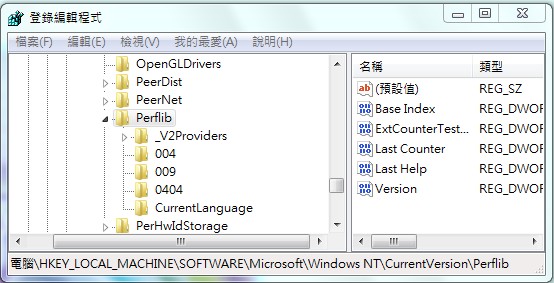
Create under perflib the subkey 004 if the issue is on the traditional Chinese version of win OS HKEY_LOCAL_MACHINE\SOFTWARE\Microsoft\WindowsNT\CurrentVersion\Perflib\004

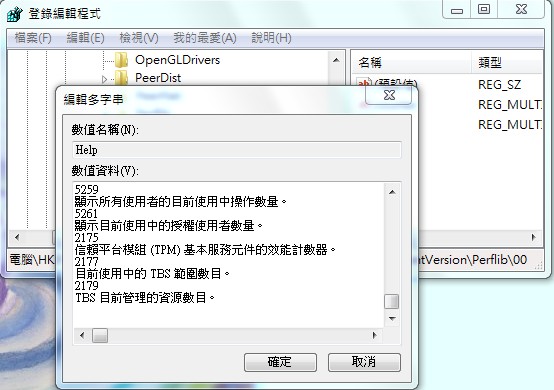
Create the following two registry entries of the "Multi-String type" (Multi-String Value)
  1. Counter
  2. Help

(Please be reminded that although the locale ID for Chinese - Taiwan is 0404, 004 is the value to use.  If you have OS in other languages, you would have to figure out the correct locale id to use since the 0404 listed didn't work for me.)

In the next step, you have to figure out the values of the last counter and last help by clicking on counter and help registry entries of either the 009 or current language subkey.  In case you are airhead like me... last counter means the last item listed for the counter registry entry and last help means the last item listed under the Help registry entry. 8-O lol 

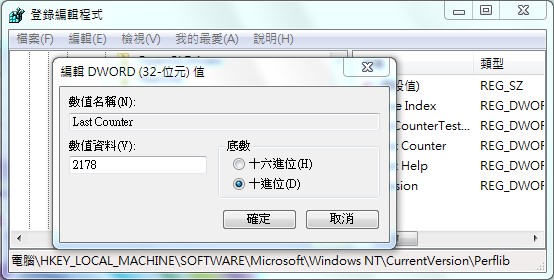
Figure out the value of last counter, which seems to be 2178 (decimal)
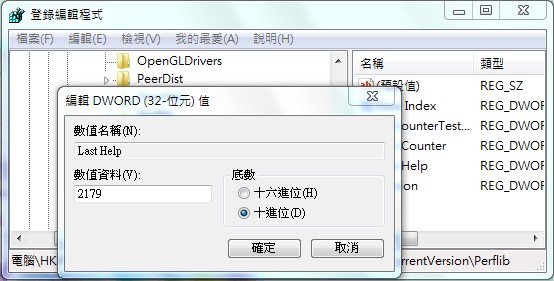
Figure out the value of last help, which seems to be 2179 (decimal)
Check the value of last counter and last help under perflib 
Change the value of Last Counter to 2178 (decimal)

Change the value of last help to 2179 (decimal)

Voila, problem solved!  After the "Performance registry hive consistency" failure was resolved, you might have to uninstalled the copy of SQL server 2008 R2 Express that didn't get installed successfully before before having to have it installed again.

Once SQL server 2008 R2 Express got installed successfully, the installation of Nvivo should go smoothly and you will have the standalone project option as well.

Bon chance!

Tuesday, August 7, 2012

First time playing with Cluster analysis in Nvivo 10


First time use the cluster analysis function of Nvivo for the data I have been working on... cool...


Gotta work on further consolidating these codes and this feature might come handy.

Tuesday, October 12, 2010

Showing child note for tree codes in Nvivo 8 SP4

What do you do the child nodes of your tree nodes look like the first image below... showing you only the first letter or two of the child nodes?


How are you gonna know which code is what? 8-O lol

Wouldn't it be nice if you could show the entire name for the code?


The solution is simple.. click "View" and check "View Child Node Headers."

Then, you will be able to drag the bar at the end of the name column to change the column width.

Wednesday, October 6, 2010

Security Update for SQL Server 2005 Service Pack 3 (KB970892) failed on Windows 7 and Nvivo

For the longest time, I would be staring at this thing alerting me a new windows update is available.  In addition, when shooting the computer down every night, I would see the machine trying to install some update again and again... night after night...

Somehow, the Security Update for SQL Server 2005 Service Pack 3 (KB970892) keeps on failing on me...

I tried all things out... to no avail...

Until yesterday, with some combination of key words, I arriving at either one of these posts...  Miracle: SQL 2005 server security update on Winows... or SQL server 2005 security updates failed and Nvivo...

8-O How did a google search bring me back to Technologies in Ratology? 8-O lol

Then, it occurred to me... no wonder... among the limited number of traffic on this site, SQL server 2005 security updates failed and Nvivo ranked number 5.  This gotta be the way people feel when they landed on my page.

However, I don't have the software with me thus don't want to uninstall Nvivo unless necessary..

After a whole lot of circling around chasing my own tail...

I contacted this friend of mine who gave me the suggestion in the first place...

"Is there a workaround if I don't want to have Nvivo uninstalled."

His reply was... this is the safest way to do it rather than playing with SQL.

So I took the expert opinion and uninstalled Nvivo 8 SP4.

I downloaded the trial Nvivo SP4 software from the website and uninstalled Nvivo SP4.  (Please make sure you take down the license key for your existing copy before uninstallation.  You can get the license number by clicking on Help-> About once you are in the Nvivo program.)

To ensure I really have Security Update for SQL Server 2005 Service Pack 3 (KB970892) installed, I went to  Microsoft website to download the standalone installation file and have it manually installed again.

After restarted the computer.  The windows update message no longer shown and that red flag telling you an update will be installed when shutting down also gone.

I, then, reinstalled Nvivo SP4 and did some simple query stuffs with the program.  Seems to be running fine.

When double checking to see whether the update is really installed, I also found KB970892 elegantly sitting among the rest of the updates.

All seems to be fine on the East side...

Two virtues I practiced today... listen to my own suggestion and that of the expert as well... lol

Now I can go look for a husband.  8-O lol

How to change the default maximum number of coding stripes in Nvivo 8?

Been playing with Nvivo...

This really stupid question came up... some documents are as long as an old lady's foot wrap (老太婆的裹足布)... and many postings might contain more than 7 codes...

How do you change the default maximum number of coding stripes in Nvivo 8 from 7 to a different number rather than having to change it each time you open a new internal document?

Spent the entire day or two trying to figure it out... and googled the entire world to no avail...

Since googling didn't take me too far, I decided to go back to the program again and take a better look at them menus...

Duh...

Go under tool and select option.

Once the Application Options window opens, click on the Display Tab... Look for the section about Coding Stripes and this is where you can change the Maximum number of stripes.


One more step away from repeated stress syndrome... 8-O lol

大目新娘... (big eye bride... a Taiwanese expression making fun of people who can't find things in easy-to-find locations)

Tuesday, October 5, 2010

Prepare to analyze a huge blogger blog with Nvivo 8- Again

I spoke of my attempt to import my ratology blogs into nvivo to take a look at the words I have typed out so far in Prepare to analyze a huge blogger blog with Nvivo 8.

At that point, I have already converted all documents from Pdf to word... with a task left to be tackled... cleaning up the word file... in batch...

I woke up the second morning and decided to take my own advice...

Restarted the process of document preparation... and now all documents have been imported into Nvivo.

What I did:

First, collected all documents from my blog onto my hard drive.

You could either download the entire blog or save the files by month....  Some of you might want to simply copy and post the texts into Nvivo... then... there is no need to read more... I guess...

Please be reminded, though, that blogger might not show you all postings on the same page and you might need to click on Show older posts link like what is shown below a few times if you have many postings per months.

In addition, the number of postings shown is dependent on the template that you have selected.  I actually exported the entire blog in XML format using blogger's export function and imported the blog as a new blog so that I could select one of the simplest template to minimize the amount of cleaning up I have to do....

The most minimalist template is "Simple II."

If you are comfortable with coding, you could also edit the template directly by going to the "Design Tab" or "Template Tab" and click "Edit Html."

Following are some of the tags you could consider taking off:

<$BlogTitle$>
<$BlogDescription$>
<$I18NPostedByAuthorNickname$>
<$BlogFeedsHorizontal$>

The stylesheet and, of course, da blogger icon, might be something to consider as well.

Second, batch edited HTML files.

Regardless how you managed to save all the HTML files on your hard drive, by default, some extra stuffs will also be saved.  To make it easier for myself, I used software programs such as dreamweaver to batch edit out these type of info.

This is the reason why, the fewer gadgets you added to the blog, the more convenient it would be for yourself during the cleaning up process.  You might need to have some basic knowledge about how to read the tags in order to find out what to take out.

Following is a screenshot showing you the interface to focus on when intending to batch edit source codes for a folder or an entire website.

The dropdown associated with search allow you to specify whether it is source code, text, etc to search.
The dropdown next to Find in allows you to select the folder or the site
In this scenario, I specify to search a specific code in the source code for the entire site.
Third, batch conversion of HTML files to Word document.

I have used the Convert Doc program to convert HTML files to word files.  Other than the fact that the program doesn't support Chinese.  It works relatively well even with trial version.

Fourth, importing files as internals.

It is very easy to import multiple files as internals in one time.  Essentially, when the import source window is open, select all file that you want to import and the program will even add the names automatically for you.

If you are going to play around with the template for your blogger blog, I highly recommend you to create a new blog using a copy of your blog exported through blogger.

Tuesday, September 28, 2010

Prepare to analyze a huge blogger blog with Nvivo 8

(Finally got all files imported.  Please check update posting on how I got the entire blog and more imported to Nvivo 8 SP4.)

This problem I am trying to tackle now... and since yesterday....

How do you analyze a blog with over 1500 postings with Nvivo 8 SP4? (A price I have to pay for having this congenital disease called verbal diarrhea... 8-X lol)

After a whole lot of trial and errors, this is what I have gotten so far these past two days.


Gathering all documents on my hard drive:

I downloaded the entire Ratology Reloaded blog using HTTrack.  Apparently, one can also use Adobe professional to convert the entire site into Pdf files directly; yet, since I already had the entire site downloaded and I didn't want to convert all external links into Pdf files, I didn't go through with the Adobe professional to download the whole site.

Converting documents to word/text files: 

Before you want to analyze anything with Nvivo, you need to be able to get the info in.  If there were fewer number of postings, such as something like 100, now, I would consider simply copying and pasting.  Yet, since I have 1500 something postings, I have to find ways to batch process documents into something Nvivo could handle.

Nvivo 8 doesn't support html files.  Thus, you either have to find a program to convert html files directly into word documents or you have to find a program to convert html files into Pdf then into word documents.

Partially having to do with the fact that I couldn't really find a free/trial software that allow me to batch file conversion from HTML to word and retain the pictures, I had converted all files from html to Pdf using the batch conversion option of Adobe professional last night.... 

Unfortunately, this morning, I found out that... oops... I had problems importing pdfs into Nvivo while, apparently, Nvivo 8 doesn't quite handle Pdf all that well.  Most importantly, it would be crazy to import all 1500 pdf files into Nvivo anyways... duh... lol

What I have accomplished so far is to test out various programs (trial version) that allows for batch conversion of files from Pdf to word.  Although others might have their preferences, I find my preference to be DeskUnPDF.... as I am typing out this... file conversion in process in the background.

Clean up the files

Some of stuffs on the files could have been cleaned up in batch at html phase.... which I would recommend you to do.

However, I didn't come to the realization until after all files have been converted into Pdfs.  These might include info such as the title of the blog and other stuffs that gets added by blogger and service providers alike automatically to your post.  Programs such as dreamweaver would allow you to edit out most of them out in batch.

In my scenario, I would have to find a software that allows me to batch edit things out of the word documents... including the notes added by DeskUnPdf to show that the file conversion was conducted using their trial version... 8-O

To Be Continued... since still in the conversion phase.

Batch conversion from PDF to Word for Nvivo 8

One task involved in using Nvivo 8 to take a look at the Ratology Reloaded blog is... document preparation... including... file conversion.

Following is my experience so far with some of the software programs that performs batch conversion from PDF to Word:

DeskUnPDF: My favorite so far is DeskUnPDF.  It retains some of the format and pictures as well. Although it concerts files with Chinese title, it doesn't convert Chinese.

For trial version, it has the restriction of converting only the first 3 pages or so.   Two things really annoying about its trial is that... it adds texts to the end of your document to remind you that the file conversion was conducted using their trial software.

Also, the trial version only allow you to convert 30 files in one setting and it takes forever to close out all the Pdf files after the conversion process is done.  Every time I tried to close all 30 files together, the program would simply hang there for some time as if it has crashed.... and... it moves... actually thought the program crashed for the first few times... After a while, you know.. well.. so it stops...... so it stops... 8-O lol

However, much lighter a file to be imported into NVivo 8 and hasn't crashed the Nvivo 8 yet during the import process.  This is why I decided to stay with this program.

Some other programs I have tested out as well.  Before DeskUnPdf, I actually was debating between PDF Ripper and Convert Doc... until I realize that files converted through convert Doc crashes Nvivo often during file import process:

PDF Ripper: The trial version gives you 15 days and it also allows you to specify an entire folder to convert.  It only allow you to convert files into rtf format but not word format.  In addition, one big problem I have with this program... but maybe be no problem to others.. the software doesn't recognize foreign characters such as Chinese.  When conducting batch processing by specifying a folder to convert, the program stalls when it encounters a file with Chinese file name.  Even if you change the file name to English, the converted file would still be all scrambled...

Convert Doc: Convert Doc works and tries its best to retain the layout when converting PDF to Word.  Unfortunately, too many graphics here and there.  In terms of HTML to other file types, have not been able to get it to work.  When trying to import the converted files into Nvivo 8 SP4, at least 3 out of 4 trials failed... and crashes the program.

PDFtoWord: For the trial version, you could only convert 1 file at a time with the max of 5 pages.  The resulting file is huge... 19 mb for a 2 page document with 2 pictures or so.  I won't recommend it.

AAA PDF to Word Converter 2.0: Installed the software but it wouldn't even launch.

123File Converter: Maybe it is file the trial version, the batch processing option either can't be found or doesn't exist.

A-PDF Word to PDF: Doesn't run on 64 bit windows.

Monday, September 27, 2010

A problem concerning exporting blogger blog to Nvivo

This problem I am trying to tackle now...

How do you export a blog and analyze it with Nvivo?

Nvivo 8 on Windows 7 problem?

Encountered a problem loading Nvivo 8 SP4 on windows 7 x64 earlier...

I tried twice and still showing me error loading kind of thing...

So, I right-click to "Run as administrator."

Problem solved.

Thursday, September 9, 2010

Stats

Recently, blogger pushed out this new function called "Stats."

Personally, I have no idea why it would have take such a long time for them to roll out this function... unless.... they were waiting for me to go to Korea and China? And, of course, it might have been me who did not pay it no mind....  8-O lol

Personally, I don't quite believe the stats because it is highly likely that some people might be browsing through blogger blogs... clicking through without paying attention.

I have observed this kind of behavior many a time when conducting my dissertation research thousand years...

What I did was a usability study, which involves the tracking of people's information research behavior.  I even cooked up some codes personally to log each every link people clicked through and the time they spent on the linked page.

The end result... I got a whole lot of data that were not too useful... for instance, a huge number of times, people stayed on the page for less than 1 second or two... unless them hundred something participants all were well versed in speed-reading... 8-O

I did take a look at what the stats blogger provides could offer....

So, I assume the data became available from May, 2010.

There are, in total, 493 visits to my Ratology Reloaded Blog and 768 visits to my Technologies in Ratology blog since May.

For all these years, I had thought that nobody ever reads my blog other than people in my imaginary world... Given these stats... even if only 1% of all visit is valid... gotta be at least one visitor who paid some mind to my reading in each of these blogs... I guess...

At the same time, it was not until much later did I discover the function called...  "Don't track your own pageview."

What is the likelihood that all these valid visits were paid by the same person... called... me? 8-O lol

Thus, the number of visit or pageviews is not equivelent to the number of people visited your page.

say, you think of IP tracking... "Why not also track the IP address?"

Given that all computers has an IP address when they are on the Internet, if I track the IP address, wouldn't it tell me that it is the same person accessing my website?

Yet, what if the same person uses different computers or different people sharing the same computers?

This is, I guess, the reason why... the beauty of log-ins....

In any case, interestingly, between May and now, there are far more people visiting my Technologies in Ratology blog than Ratology Reloaded blog.

For the Technologies in Ratology blog, the topic five postings people visited are:

Nov 20, 2009
173 Pageviews
Nov 28, 2009, 2 comments
89 Pageviews
Dec 9, 2009
78 Pageviews
Nov 18, 2009, 2 comments
57 Pageviews
Nov 10, 2009
37 Pageviews

It seems like that most of the hits are associated with Windows 7 related issues...  especially the problem associated with the "blocking of Sonic Solution DLA driver".

On the other hand, the top five postings people visited for Ratology Reloaded blog during the same time period are:

May 4, 2010
62 Pageviews
Oct 1, 2009, 2 comments
25 Pageviews
Oct 16, 2009
12 Pageviews
Sep 7, 2010
10 Pageviews
Aug 30, 2010
7 Pageviews

Apparently, I was not the only person getting this message on my answering machine telling me to call 8772476116.  Many people might have also gotten that harassing call many a time and this is why so many people would land on that post.

It did sort of surprised me to see the posting "How do normal people think?" rank as #2... though only 25 visits recorded as per Blogger.

Apparently, many more people on this planet also have the same question?  And, they must have been pretty disappointed when realizing all that I did was posting a question...

On a second thought, it does make sense why Technologies in Ratology, with only 94 postings, seems to have attracted far more traffic than Ratology Reloaded, with 1461 postings....

First of all, the nature of the content... Postings in Technologies in Ratology mostly have something to do with the "how-to" associated with a specific technical issue and the solution. The fact that What not to do when calling 8772476116 was one of the most visited posting could also be considered as the supporting evidence to this assumption.

However, as indicated by my writing in Ratology Reloaded, I have been reloading around like a dog chasing its own tail for the past few years... Still... I have no idea whether there will ever be a day when the solution will converge... 8-O 8-X

In other words, one blog is solution-oriented while the other takes on the process model...

Second, key words... most of the postings in Technologies in Ratology involves specific keywords in either the title or the content.  For instance, yesterday, I resolved the recurring problem of "access connection cannot run on this platform" on this ThinkPad and the title of the posting was the error message itself... "access connection cannot run on this platform."  When searching for a solution, I also googled the entire error message... and guess so will everyone else looking for a solution for the same problem?!  (And, perhaps, this is how normal people think.... 8-O)

Ratology Reloaded, on the other hand, contains contents and key words mostly useless to ordinary people.... 8-O  Think about this... the posting about progression... Unless I already know what the heck this blog is talking about, what the hell would I care about your progression in life?   Also, why would I want to waste my time listening to you pondering about What is my style... 8-O lol

Anyways... waking up this morning, I decided to take a look at the feature of Stats of blogger... not quite sure what to do about it other than checking them numbers out... and... this is, now, what I've got... (Also, ratprincess, cut Ratology Reloaded some slacks and please don't be so harsh... 8-O lol)

At the same time, for sure... numbers don't like... except for... it is all about your interpretation. 8-O lol

(This posting is cross-posted in Ratology Reloaded... Just in case you wonder... a note for my aging self...)

Wednesday, September 8, 2010

Nvivo on Macs?

Thought of this question that I have been asked many a time...

Does Nvivo run on Macs?

Depends on how you define "running on Macs"... and Intel-based Macs...

As of today, Nvivo can only run on Microsoft Windows OS... and, of course, nowadays, there are many different ways to run Windows OS on Macs... parallel, boot camp, VMWare...  etc...

If this is what you mean by... "Does Nvivo run on Macs? or "Can I install Nvivo on Macs?"

For more specific info concerning the system requirement for Nvivo, please check the following link: http://www.qsrinternational.com/products_nvivo_system-requirements.aspx

For questions concerning how it might be feasible to run Nvivo on Macs, check this other link: http://www.qsrinternational.com/support_faqs_detail.aspx?view=113

What about Linux?  I don't think so... yet... don't quote me...

Software programs compatible with Windows 7 64 bit

The machine I am using now runs Windows 7 64 bit...

Following are some of the programs I have been using without any problem...

  1. Skype 4.2.0.169
  2. Picasa 3
  3. NVivo 8 sp 4
  4. PASW 18 (SPSS)
  5. Office 2010
  6. McAfee 8.7.0i
  7. CS3
  8. Sorenson Squeezer 4.0
  9. Quicktime 7 (However, I did have some problem earlier on when trying to edit some movie files. Since I have only access to this Windows 7 64 bit machine, can't tell you whether the problem is really associated with the OS version.
  10. Universal USB Installer
  11. Canon utilities such as ZoomBrowser Ex and PhotoStitch
  12. Browsers
  • Internet explorer
  • Chrome
  • Firefox


Monday, December 21, 2009

Windows 7 and software competibility

I will be continuously updating this list as the time goes on... (started 10/30/2009 last updated 12/21/2009)


The following software programs run on windows 7

Data Analysis
  1. SPSS 17
  2. PASW 18 for PC (Formally known as SPSS)
  3. SPSS SmartViewer 15.0
  4. SAS 9.2
  5. Mplus 4
  6. Nvivo 8 sp4
Browsers
  1. Firefox
  2. Opera
  3. SeaMonkey 2.0
  4. K-Meleon
  5. Safari
  6. IE
  7. Chrome
Office tools
  1. Office 2007
  2. Endnote X2
  3. OpenOffice 3.1
File Transfer
  1. WinSCP 3.7.4
Internet Security Software
  1. McAfee 8.7
  2. Malwarebytes's Anti-malware
Multimedia
  1. Creative Suite 4 (e.g., Adobe Acrobat Pro, Photoshop, Dreamweaver)
  2. Snagit 7.2.1
  3. Captivate 4
  4. iTunes 9.0.2.25
  5. Windows Media Player 12.0.7600.16415
  6. Sorenson Squeeze 6 (trial version)
  7. Sorenson Squeeze 4
  8. Quicktime Pro 7


Diagramming and concept mapping software
  1. Inspiration 8
  2. OrgChart (Trial version)

Other
  1. Meeting Maker 6.0
CD/DVD burning software
  1. iTunes 9.0.2.25
  2. Windows Media Player 12.0.7600.16415
  3. Roxio Creator DE
Software programs do not run on windows 7
  1. nvivo 8
  2. McAfee 8.5